Power BI vs Tableau vs Looker Studio: Which Is Right for Your Business?
Choosing the right business intelligence (BI) tool can make a significant difference to how effectively your business uses data. Microsoft Power BI, Tableau and Google Looker Studio are three popular platforms for transforming raw data into meaningful insights, but each offers different strengths, capabilities and costs.
Whether you're a growing Australian business looking to move beyond spreadsheets or an established organisation wanting to improve its reporting capabilities, understanding the differences between these tools is essential.
In this guide, we compare Power BI, Tableau and Looker Studio to help you determine which business intelligence solution best suits your needs.
What Are Power BI, Tableau and Looker Studio?
All three platforms help businesses analyse data, build dashboards and visualise performance. However, they differ in their approach to data analytics and reporting.
Microsoft Power BI: Best for Microsoft-Centric Businesses
Microsoft Power BI is a business intelligence platform that integrates closely with Microsoft products such as Excel, Teams, Azure and Dynamics 365.
It's particularly popular among Australian businesses already using Microsoft 365, offering powerful data modelling, automated reporting and interactive dashboards.
Key advantages include:
Strong integration with Microsoft applications and services.
Advanced data modelling and analytical capabilities.
Automated data refreshes and interactive reporting.
Scalable solutions for small businesses through to large enterprises.
Competitive entry-level pricing for professional BI capabilities.
Implementation Considerations:
Advanced features require knowledge of DAX, Power BI's formula language.
Sharing and collaboration may require additional licences.
Complex data models can require specialist expertise.
Best suited for: Businesses using Microsoft technologies that need scalable reporting, financial dashboards and operational analytics.
Tableau: Best for Advanced Data Visualisation
Tableau is recognised for its sophisticated data visualisation capabilities, allowing users to explore complex datasets through highly interactive dashboards.
Its flexible design makes it attractive to organisations with dedicated analytics teams or businesses that need detailed visual storytelling.
Key advantages include:
Highly customisable, interactive visualisations.
Powerful tools for exploring complex datasets.
Connections to numerous databases and cloud platforms.
Strong capabilities for identifying patterns and trends.
Suitable for sophisticated enterprise analytics.
Implementation Considerations:
Licensing can be more expensive than alternative solutions.
Advanced functionality can involve a steeper learning curve.
Dashboard development may require specialised skills.
Best suited for: Data-driven organisations with complex analytical requirements, particularly those prioritising advanced visualisation and exploratory analysis.
Google Looker Studio: Best for Marketing and Simple Reporting
Google Looker Studio is a cloud-based reporting platform that enables businesses to create interactive dashboards using data from multiple sources.
Its integration with Google Analytics, Google Ads and Google Sheets makes it particularly useful for marketing teams, digital agencies and smaller businesses.
Key advantages include:
A free version suitable for many reporting requirements.
Straightforward dashboard creation and sharing.
Convenient integration with Google's marketing ecosystem.
Cloud-based collaboration and accessibility.
Useful templates for common reporting needs.
Implementation Considerations:
Less sophisticated data modelling than Power BI.
Complex reporting may require additional connectors or preparation.
Performance can vary depending on the data source and dashboard complexity.
Best suited for: Small businesses, marketing teams and agencies needing accessible, cost-effective dashboards.
Power BI vs Tableau vs Looker Studio: Feature Comparison
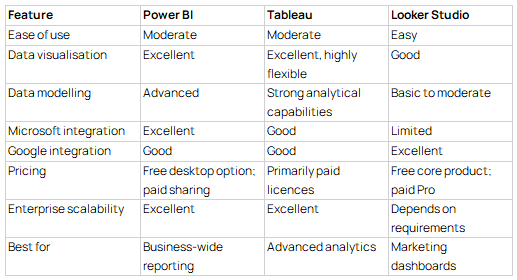
Note: Pricing, licensing and product capabilities can change. Check official vendor websites for current Australian pricing and features.
Which BI Tool Should Your Business Choose?
The right choice depends on your existing technology, reporting requirements, available resources and long-term data strategy.
Choose Power BI if You Want Integrated Business Reporting
For an Australian retail business managing sales, inventory and financial performance through Excel and Microsoft Dynamics, Power BI could provide a centralised reporting solution.
Instead of manually combining spreadsheets each month, the business could automate data collection and monitor key performance indicators (KPIs) through interactive dashboards.
Power BI is particularly attractive when organisations want to establish consistent, business-wide reporting.
Choose Tableau if You Need Deeper Data Exploration
Consider a national logistics company analysing delivery times, geographic performance and operational efficiency.
Tableau's advanced visualisation capabilities could help analysts explore delivery patterns, investigate bottlenecks and communicate findings across different regions.
For businesses with sophisticated analytical requirements, Tableau offers considerable flexibility.
Choose Looker Studio if Marketing Performance Is Your Priority
An Australian digital marketing agency managing multiple client campaigns might use Looker Studio to consolidate Google Ads, Google Analytics 4 and website performance data.
This allows account managers to create accessible dashboards showing traffic, conversions and campaign performance without investing heavily in enterprise BI software.
For straightforward marketing reporting, Looker Studio can be a practical starting point.
Beyond Software: Why Your Data Strategy Matters
Selecting a business intelligence tool is only one part of building effective data analytics capabilities.
Even the most sophisticated dashboard won't deliver reliable insights if the underlying data is inconsistent, incomplete or poorly structured.
Before investing in a platform, consider:
Data quality: Is your business information accurate and consistent?
Integration: Can the platform connect to your existing systems?
Scalability: Will it support your reporting needs as the business grows?
Accessibility: Can employees easily understand and use the dashboards?
Governance: Are data access, security and reporting definitions properly managed?
Working with an experienced data consultancy can help organisations address these questions before committing to a particular platform.
A well-designed data strategy ensures your business intelligence investment delivers meaningful insights rather than simply producing more reports.
Final Verdict: Power BI, Tableau or Looker Studio?
There's no universal winner in the Power BI vs Tableau vs Looker Studio comparison.
Power BI is often the strongest option for businesses seeking integrated, scalable reporting, especially within the Microsoft ecosystem. Tableau excels when advanced data exploration and sophisticated visualisations are priorities. Looker Studio offers an accessible and cost-effective solution for marketing analytics and simpler reporting requirements.
Ultimately, the best BI tool is the one that aligns with your business objectives, technical environment and the decisions your teams need to make.
Need Help Choosing the Right Business Intelligence Platform?
Choosing the right technology is easier when you understand what your data needs to achieve.
Our Sydney-based data consultancy helps Australian businesses turn fragmented information into reliable reporting, interactive dashboards and actionable insights.
Whether you're considering Power BI implementation, Tableau dashboards or a broader business intelligence strategy, we can help you identify the right approach for your organisation.
Contact our team to discuss how better data analytics and reporting can support smarter business decisions.